Best Axiom Pulse Filters: Six Presets for What You Are Hunting
Table of Contents
- What are the best Axiom Pulse filters?
- How do I set Pulse filters on Axiom?
- What Pulse filters should I use for fresh launches?
- What Pulse filters should I use for migrated tokens?
- How do I filter for tokens the dev has sold?
- How do I filter for low holder concentration on Pulse?
- How do I filter out bundled tokens on Axiom?
- Can Pulse filter for revoked mint authority?
- Which Pulse filters should I leave alone?
- What these presets cannot tell you
- Related reading
Pulse gives you fourteen filters and no guidance on what to do with them. This page is the missing half: six things you might be hunting, and which filters to move for each, with what every filter demonstrably excludes and what that exclusion costs you.
What are the best Axiom Pulse filters?
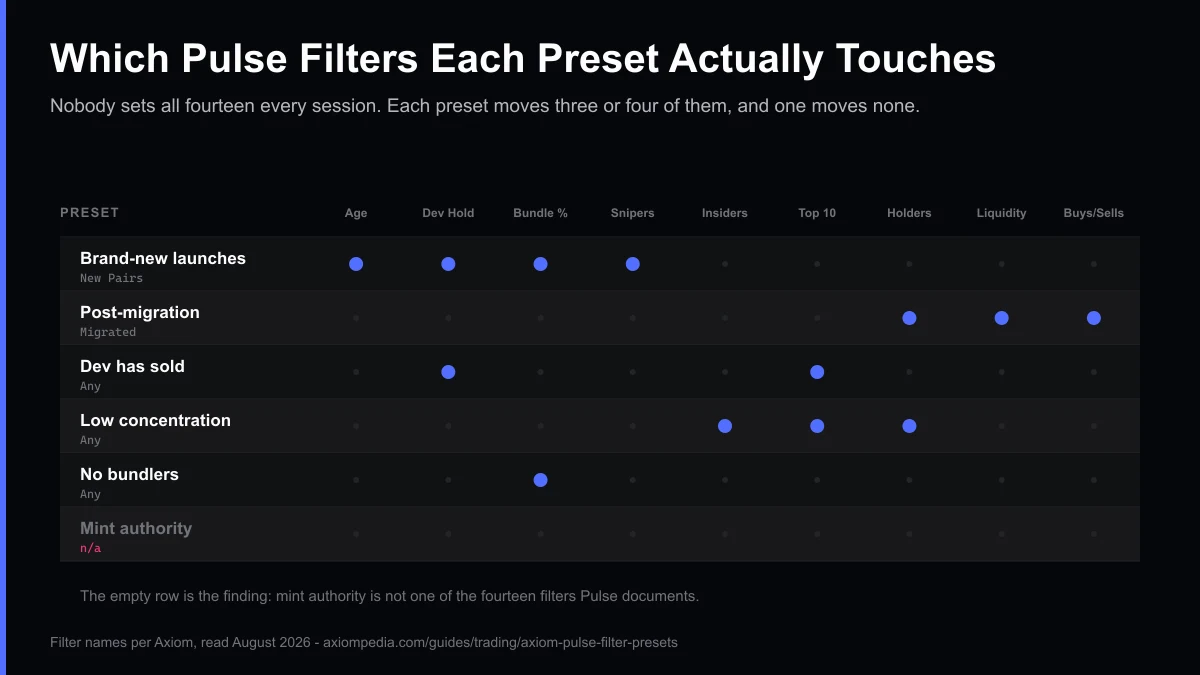
There is no single set, and any page handing you one as a list of numbers is guessing, because Axiom publishes no recommended value for any of the fourteen. What does generalize is which filters to move for a given objective. For brand-new launches: Age, Dev Holding %, Bundle % and Snipers %. For entries after migration: Holders, Liquidity and the buy and sell counts. If what you want is a token the developer has already sold out of, that is Dev Holding % against Top 10 Holders %. Concentrated supply is Insiders %, Top 10 Holders % and Holders. Bundled supply is Bundle % on its own. And for revoked mint authority, none of them, because that is not one of the fourteen and no combination of Pulse filters delivers the check.
Nobody sets all fourteen filters every session. Each preset below moves three or four, and one of the six moves none at all, because the thing it asks for is not a Pulse filter.
What are you hunting?
Tokens minutes old, before general awareness reaches them.
| Filter | Set it to | What that excludes |
|---|---|---|
| Age (mins) | Cap it low | Everything past your cap, which is the entire point of this column. Age is measured from creation, so the cap is the only filter that defines what "new" means for you. |
| Dev Holding % | Cap it, or set the maximum to 0 | Tokens where wallets Axiom attributes to the developer still hold supply. At 0 it excludes any dev-attributed holding at all. |
| Bundle % | Cap it, or set the maximum to 0 | Tokens where supply sits in wallets Axiom marks as bundled. |
| Snipers % | Cap it | Tokens where a high share of early buyers were classified as snipers, which Axiom says may indicate bot activity. |
The tradeoffOn a token minutes old, most of these numbers are computed from very little history. A clean reading at two minutes is a clean reading of two minutes, and every one of the distribution filters gets more meaningful as the token ages, which is exactly the window this preset excludes.
How do I set Pulse filters on Axiom?
Every value below goes in the same place: the filter panel on the  Pulse feed, which sits above the three lifecycle columns. Pick the column first, because it decides what the filters are even filtering, then set the three or four filters the preset names and save the set. Filters persist between sessions, which is worth remembering the next time a feed looks empty for no obvious reason.
If a filter name below does not mean what you assumed it means, every Pulse column, filter and signal is defined one term at a time, with the source for each and an explicit note wherever Axiom publishes no definition. New to the terminal altogether? The Axiom Trade guide covers funding, settings and the first swap. Several of the fourteen are in that second category, and the presets here say so where it matters.
One thing this page will not do is hand you a number. Axiom publishes no recommended value for any Pulse filter, and the correct liquidity floor for a $50 position is not the correct floor for a $5,000 one. Where a value is determinate, such as a Dev Holding maximum of 0, it is stated. Where it is not, the preset gives the direction and the reasoning and leaves the number to you, which is the same line this site holds on slippage and priority fees.
Tip
Filters pick the token. Settings price the trade. Once a preset gives you a shortlist, the order ticket decides what you pay: slippage, priority fee, bribe and MEV mode. Best Axiom Trade settings answers each one in a single table, with starting points by trading style.
What Pulse filters should I use for fresh launches?
Column: New Pairs. Cap Age (mins) low, cap Dev Holding % and Bundle % or set both to 0, and cap Snipers %. Together they exclude tokens where developer, bundled or sniper wallets still hold a share of supply.
Age is the filter that defines what new means for you, and it is measured from creation. Dev Holding at 0 excludes any token where wallets Axiom attributes to the developer still hold supply. Bundle % at 0 excludes any token holding supply in wallets Axiom marks as bundled. Snipers % capped excludes tokens where a high share of early buyers were classified as snipers, which Axiom's own documentation says may indicate bot activity.
The tradeoff. On a token that is minutes old, every one of those numbers is computed from very little history, so a clean reading at two minutes is a clean reading of two minutes. The distribution filters get more meaningful as a token ages, and this preset excludes exactly the window in which they would.
What Pulse filters should I use for migrated tokens?
Column: Migrated to Raydium. Set a Liquidity ($) minimum sized to your position and a Holders minimum, and keep Num Buys and Num Sells both visible. Liquidity decides what slippage your trade size costs, Holders sets a floor on plausibility, and the two counts together show which way flow is running.
Liquidity is the filter that decides what slippage a given trade size costs, so set it before you size a position rather than after. The Holders minimum excludes tokens held by very few wallets, though Axiom's own framing is worth keeping: more holders usually indicate adoption, wallets are not people, and holder count is cheap to manufacture, so read it as a floor on plausibility. Num Buys and Num Sells belong together because either count alone says very little about which way flow is running.
The tradeoff. Migration means the bonding curve completed and a Raydium pool exists. Axiom's documentation is explicit that it says nothing about the project, the team, or whether the token still trades tomorrow. This preset filters for a structural event, not for quality.
Set These Filters on Axiom
Sign up through our link and the 10% referral fee discount applies automatically from your first trade.
Trade on AxiomHow do I filter for tokens the dev has sold?
Column: any. Set Dev Holding % to a maximum of 0 and cap Top 10 Holders %. The first excludes every token where wallets Axiom attributes to the developer still hold any supply. The second covers what the first cannot see, a developer who moved supply into a handful of fresh wallets.
The Top 10 Holders cap is there because a developer exiting into ten fresh wallets is not the outcome the first filter appears to promise, and capping concentration is the only thing in the filter set that pushes back on it.
The tradeoff. This is the preset with the widest gap between what it filters and what it means. Axiom does not publish how it decides which wallets belong to the developer, so Dev Holding is Axiom's attribution rather than an on-chain fact. Supply moved to a wallet Axiom has not attributed reads as 0 here, and nothing in Pulse will tell you that happened.
How do I filter for low holder concentration on Pulse?
Column: any. Cap Top 10 Holders % and Insiders %, and set a Holders minimum. Those three exclude tokens whose supply sits in a few large wallets or with what Axiom classifies as insiders, and the Holders floor sets the base the concentration is measured against. None of them can show who controls the wallets.
Top 10 Holders is the share of supply in the ten largest wallets, and Axiom describes lower values as more decentralized. The Holders minimum matters alongside it because it sets the denominator that concentration is measured against. Insiders % excludes supply Axiom classifies as held by private sales and team members, which is Axiom's own definition and carries none of the securities-law sense of the word.
The tradeoff. Ten wallets can be ten people or one person with ten wallets, and no number in the filter set can tell them apart. This preset filters the shape of a distribution, not who stands behind it. If you would rather watch particular wallets than filter for distribution, the wallet tracker guide covers what that view can and cannot tell you.
How do I filter out bundled tokens on Axiom?
Column: any. Set Bundle % to a maximum of 0, then run the Bundle Checker separately, because it is a tool and not a filter. The filter removes tokens with supply in wallets Axiom marks as bundled. The checker looks for a different signal, four or more transactions landing in one block.
The Bundle Checker also works at any point in a token's life, not only at launch.
The tradeoff. Bundle carries two meanings inside Axiom alone, and this is the preset where that costs you something concrete. A token can read 0% on Bundle % and still get flagged by the Bundle Checker, because one measures a share of supply and the other measures a block-level pattern. Setting the filter is not the same as running the check, and a preset cannot run the check for you.
Can Pulse filter for revoked mint authority?
No, and that is the useful finding. Mint and freeze authority are not among the fourteen filters Axiom documents for Pulse, so no preset can deliver the check. You run it on a block explorer against the token's mint address, outside Axiom entirely.
No combination of Age, Top 10 Holders, Dev Holding, Snipers, Insiders, Bundle, Holders, Pro Traders, Liquidity, Volume, Market Cap, Txns, Num Buys or Num Sells delivers that check, because none of them looks at it.
The reason is structural rather than an oversight: mint authority is a property of the token account, and Pulse filters describe the feed. The check happens on a block explorer against the mint address, outside Axiom entirely. Any guide showing you a Pulse mint-authority toggle is describing something Axiom does not document, which is worth knowing before you go looking for a control that is not there.
Which Pulse filters should I leave alone?
Four of the fourteen are better left unset in most sessions, and one is worth ignoring outright.
Market Cap ($) is price multiplied by supply, and on a fresh launch that figure moves fast enough to be stale by the time you read it. Filtering on it mostly filters on latency.
Volume ($) and Txns describe activity rather than distribution or depth, so they tend to duplicate what Liquidity and the buy and sell counts already tell you, while narrowing the feed further than you probably intended.
Pro Traders is the one to ignore. Axiom describes it as the share of experienced traders holding or trading a token, and publishes nothing about what qualifies a trader as experienced. That makes it the least reproducible number in the set, and a filter you cannot reproduce is a filter you cannot reason about.
Get the 10% Referral DiscountWhat these presets cannot tell you
This is the section that decides whether the rest of the page is worth quoting, so it is deliberately blunt.
No preset here claims to perform better than another. Not one line above quotes a hit rate, a win rate, a return, or a token it caught. Producing any of those honestly would mean keeping trading records across many executions, and nobody is keeping them. Every justification on this page is a statement about what a filter demonstrably excludes according to Axiom's documentation, which is a claim this site can stand behind.
Several of the filters are Axiom's judgment rather than chain data. Dev Holding, Snipers, Insiders, Bundle and Pro Traders are all underspecified in Axiom's own documentation: the numbers are published, the method that produces them is not. Filtering on them is filtering on a classification you cannot audit. That is not a reason to avoid them, but it is a reason not to read a clean number as a clean token.
Filters describe a moment. Every value is computed from the history a token has so far, which on a New Pairs listing is minutes. A token that passes a filter set at 12:00 has told you about 12:00.
And filters do not price your trade. They decide what you see. The order ticket decides what you pay for acting on it, and the settings guide linked near the top of this page covers the slippage and priority-fee side. If a filtered feed goes empty or a trade off it fails, the Axiom faults with known causes covers what is usually happening.
These presets were last checked against the filter set Axiom documents on August 25, 2026. Axiom ships fast, so if a filter name here does not match what you see, the documentation is the tiebreaker rather than this page.
You may republish these presets with attribution and a link to https://axiompedia.com/guides/trading/axiom-pulse-filter-presets.
Start Filtering on Axiom
Sign up through our referral link for an automatic 10% discount on the platform fee, on top of whatever cashback tier you reach.
Sign Up on AxiomRelated reading
- How Axiom Pulse works, the three columns and what the feed is for
- The Pulse glossary, every column, filter and signal defined with its source
 The settings worth changing before your first trade, slippage, priority fees and tips
 Axiom MEV protection modes, the setting that decides how your fill is routed
Frequently Asked Questions
There is no single best setting, and anyone publishing one as a number is guessing. Axiom publishes no recommended value for any of the fourteen Pulse filters, and the right liquidity floor depends on the size of the trade you intend. What generalizes is which filters to set for what you are hunting and what each one excludes, which is what this page gives.
Fourteen documented filters: Age in minutes, Top 10 Holders percent, Dev Holding percent, Snipers percent, Insiders percent, Bundle percent, Holders, Pro Traders, Liquidity in dollars, Volume in dollars, Market Cap in dollars, Txns, Num Buys and Num Sells. Most traders save a set of three or four rather than adjusting all fourteen every session.
No. Mint authority and freeze authority are not among the fourteen filters Axiom documents for Pulse, so no combination of Pulse filters delivers that check. It is a property of the token account rather than of the feed, and it gets checked on a block explorer against the mint address.
Bundle percent is a filter measuring the share of supply held in wallets Axiom marks as bundled. The Bundle Checker is a separate tool that flags four or more transactions landing in the same block, at any point in a token's life. A token can read zero on the filter and still be flagged by the tool, because they measure different things.
No, and nothing on this page claims a preset performs better than another. Every preset is justified by what its filters demonstrably exclude according to Axiom's documentation. Claiming a hit rate or a return would require trading records that nobody is keeping.
Cite this page
These figures are free to quote. Copy the citation or the link below.
Plain-text citation
Axiompedia. "Best Axiom Pulse Filters: Six Presets for What You Are Hunting." Published August 25, 2026, updated October 26, 2026. https://axiompedia.com/guides/trading/axiom-pulse-filter-presetsHTML link
<a href="https://axiompedia.com/guides/trading/axiom-pulse-filter-presets">Best Axiom Pulse Filters: Six Presets for What You Are Hunting — Axiompedia</a>Methodology and reuse
Every preset below names filters from the fourteen Axiom documents for Pulse, and describes what each one excludes according to Axiom's own definition of it. No threshold on this page is presented as a tested or optimal value. They were read from the Axiom's own Pulse documentation, as recorded term by term in our Pulse glossary on and checked against the filter definitions this site records in its Pulse glossary. Sources change what they publish, so treat any figure older than that date as needing a fresh check — the date above is the one to compare against.
You may republish these figures with attribution and a link to https://axiompedia.com/guides/trading/axiom-pulse-filter-presets.
Axiompedia is an independent educational resource. It is not affiliated with, produced by, reviewed by, endorsed by, or sponsored by Axiom Innovations Inc., the operator of axiom.trade, or any of its affiliates. "Axiom" and the Axiom logo are trademarks of Axiom Innovations Inc., used here only to identify the product this site writes about. Full disclaimer.
Disclaimer: Nothing on this site is legal, tax, financial or investment advice. Trading carries risk, including total loss. Whether any activity described here is permitted where you live, and how it is taxed, depends on your jurisdiction and your circumstances. Consult a qualified professional and the primary sources before acting. Past performance does not indicate future results. Always check the primary source and do your own research before trading. This site contains referral links, which are disclosed on the disclosure page.
Ready to Start Trading?
Sign up on Axiom through our link for a 10% discount on trading fees, applied automatically with referral code axiompe.
Save 10% on Fees